
Free Video QR code generator
Make it easy to access tutorials, trailers, or educational content. Increase the visibility of your content by sharing videos easily.
What is a Video QR Code?
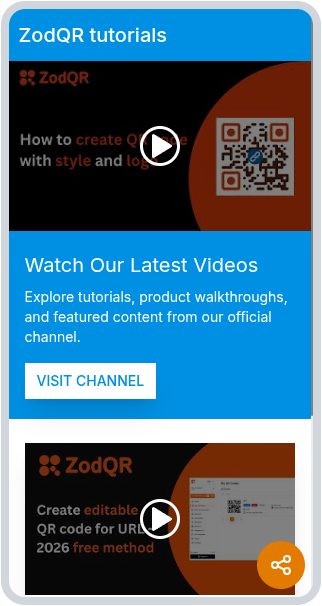
ZodQR's video QR code is a dynamic QR code solution to share one or multiple Youtube video in a single mobile-friendly page, where all videos are displays.
With this QR solution, you can connect your audience with your video content: school lessons, marketing video, or music video playlist. Your audience can simply scan the QR code to view all videos, instead of typing links manually.
What information can I display on a QR Code Video?
When converting one or more videos to QR code with ZodQR, you will have a mobile-friendly page with following elements:
- Information about your business: company name, headline, website link and a short description.
- Unlimited Youtubes videos with description for each video. You can also highlight the first video to the top of the page.
- An optional CTA button which is customizable, link to your landing page or website.
- Links to your social medias (there are a lot of socials you can add) with their respective icons.
- A sharing button, allows the visitors to quickly share your Video QR to their friends.
Why should I use QR Code Video?
Share multiple YouTube videos at once
You can upload and display multiple Youtube videos in a single page, and people only need a quick scan using their smartphone to instantly access to your content.
Bring video resource to print marketing
By using a simple QR code, you can bring your marketing videos to the printing materials: flyers, brochures and more. Since the Video QR code is a dynamic QR code, you can keep your content never outdated.
Edit your QR Code Video any time, track how your QR perform in real-time
You can edit your videos any time: add new videos, re-arrange, or remove old videos without reprinting QR code - your Video QR code will be updated instantly. ZodQR's dynamic QR codes also provide real-time data about how your QR code perform: tracking time scanned, unique vs. total scans, tracking location by country or city, and the device info - help you further optimize your campaigns.
Customize to match your brand needed
With Video QR code, you can customize:
- The videos page, with your brand color, highlight the most important video, or add social media links to help your audience connect with you via more platform.
- QR code image - you can add your logo, custom color or shape
Why ZodQR is the best free QR code generator for Video?
- No paid subscription required: with ZodQR, you can generate Video QR code, keep it active forever without paying for monthly subscription.
- Customizable QR code: custom QR code color, shape, and add logo to your QR code is totally free with ZodQR.
- QR code will never expire: QR code generated with ZodQR will never expire, even if you are in the Free forever plan.
- Full-suite QR code solutions: ZodQR is not only a Video QR code generator. We have 30+ QR code solutions for all business purpose, and all free to create.
How to create QR Codes for video with ZodQR?
Creating Video QR is free and easy with ZodQR, just follow the steps bellow:
- Sign up for a free (forever) account.
- Once your account is activated, select Create QR Code in the dashboard and choose Video.
- Name your code and customize the summary page colors to match your style or brand identity. You can also upload a featured image, logo, or welcome screen to amplify your branding.
- Add your company name, a headline, and a short description to provide information about your page. You also have the option to include a custom CTA button with an additional link (like your website or landing page).
- Copy your video’s YouTube URL and select Add Video. If you’re adding multiple videos, use the checkbox to highlight which one should display first. The YouTube description is automatically added for each video but can be edited if needed.
- Include social media links through their respective icons and an optional sharing button.
- Select a ready-made QR Code frame and add custom text to encourage your audience to scan the code to view your videos.
- Add final touches, such as placing a logo in the center of your QR Code and adjusting its color to match your brand.
- Once satisfied, download the QR Code and incorporate it into your print and digital marketing materials.
Where to use the Video QR code - examples of Video QR code usecase
Video QR Codes are incredibly versatile and can fit into many business environments. Here are some industries that can benefit from this innovation:
Gyms & wellness studios
Gyms and wellness studios can use Video QR Codes in their establishments to share workout tutorials, helping members exercise independently. They can also incorporate them into marketing materials, such as banners, to showcase videos of their facilities and classes—an excellent way to attract potential clients.
You can even share step-by-step video instructions with QR Codes, adding them to workout equipment to help members ensure they’re using the equipment correctly.
Tourism
Offering a glimpse of your tourist experiences is a great way to generate interest in your services. QR Codes for travel make this possible by linking to videos that showcase destinations or feature customers enjoying activities, encouraging more bookings.
Professional use
For videographers, wedding planners, architects, makeup artists, or other professionals who showcase their work with videos, QR Codes are invaluable. Use Video QR Codes for portfolios by linking to recordings of your work and sharing them via business cards, print ads, or your website to reach potential clients. A QR Code resume is also a great way to stand out in a competitive job market.
What are some best practices for using a QR Code Video?
Your success with Video QR Codes will depend on how you create and implement them. Here are some best practices to keep in mind for optimal results:
Uploading videos
Although you can upload unlimited YouTube videos to a Video QR Code, it’s best to include only a few of your best, shorter-length videos. Using long or excessive videos can slow page loading times and overwhelm your audience.
Minimum size
We recommend a minimum QR Code size of 2 x 2 cm (around 0.8 x 0.8 in) to ensure easy scannability by QR Code readers and smartphone cameras. If you’re unsure whether your QR Code is too small, opt for a larger size to avoid scanning issues. QR Codes are highly flexible and can always be scaled up—even up to the size of a billboard ad.
Logo
Add your logo to the center of your custom Video QR Code. This enhances brand recognition and can help customers feel confident about scanning your codes.
Colors
With flexible tools like ZodQR and Canva, you can seamlessly align marketing assets with your overall brand identity. Use Canva’s customization features to design promotional materials and ZodQR to create branded QR Codes that match your style.
Just keep in mind a few QR Code design essentials: Always use a darker foreground color with a lighter background color, and maintain a quiet zone around the code to avoid scanning issues.
Printing formats
Choose the most appropriate download format for your intended marketing medium to ensure seamless scanning. For example, JPG is a great option for print media.
ZodQR offers four image file formats for QR Codes—JPG, PNG, EPS, and SVG—giving you complete flexibility over what you add QR Codes to and how you use them.
FAQ
Yes. With ZodQR, you can create Video QR codes for free. You can generate Video QR code using the tool on the top, then create a free account to manage your QRs.